플레이어의 로코모션은 기본적으로 모션 매칭을 사용할 것이다.
언리얼 엔진의 모션 매칭(Motion Matching) 은 쿼리 기반 애니메이션 포즈 선택 시스템입니다. ...
기존 애니메이션 시스템과 달리 모션 매칭은 애니메이션 데이터 세트에서 정보에 기반한 애니메이션 포즈를 선택하여 애니메이션 시퀀스 간에 트랜지션 또는 블렌딩 로직을 구성하지 않고도 반응형 애니메이션 시스템을 생성할 수 있습니다.
(언리얼 엔진 공식 문서에서 발췌)
https://dev.epicgames.com/documentation/ko-kr/unreal-engine/motion-matching-in-unreal-engine
이걸 쓸거긴한데.. 실제로 애니메이션 데이터베이스를 직접 만드려면 다량의 애니메이션 데이터가 필요한데,
자연스러운 애니메이션을 만드려 할 수록 더 많은 애니메이션이 필요하다.
현실적으로 직접 애니메이션 데이터베이스를 만드는 것은 무리라고 생각되어, 에픽게임즈의 에셋을 이용하기로 했다.
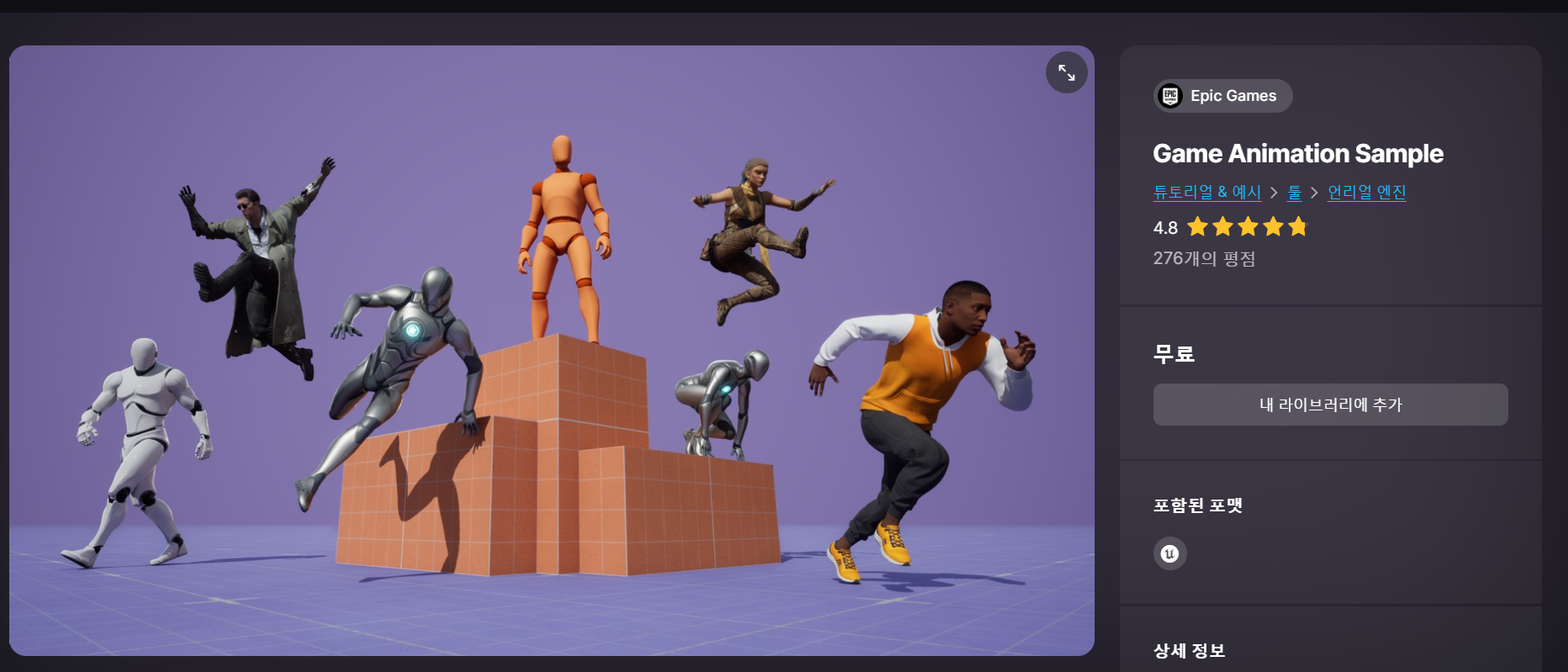
해당 샘플 프로젝트에는 모션 매칭이 적용된 캐릭터 에셋이 들어가있다.
여기있는 캐릭터에, 껍데기만 다음 영상을 참고하여 변경해주었다.
https://www.youtube.com/watch?v=rgoFtuvyAKQ
적용된 캐릭터:
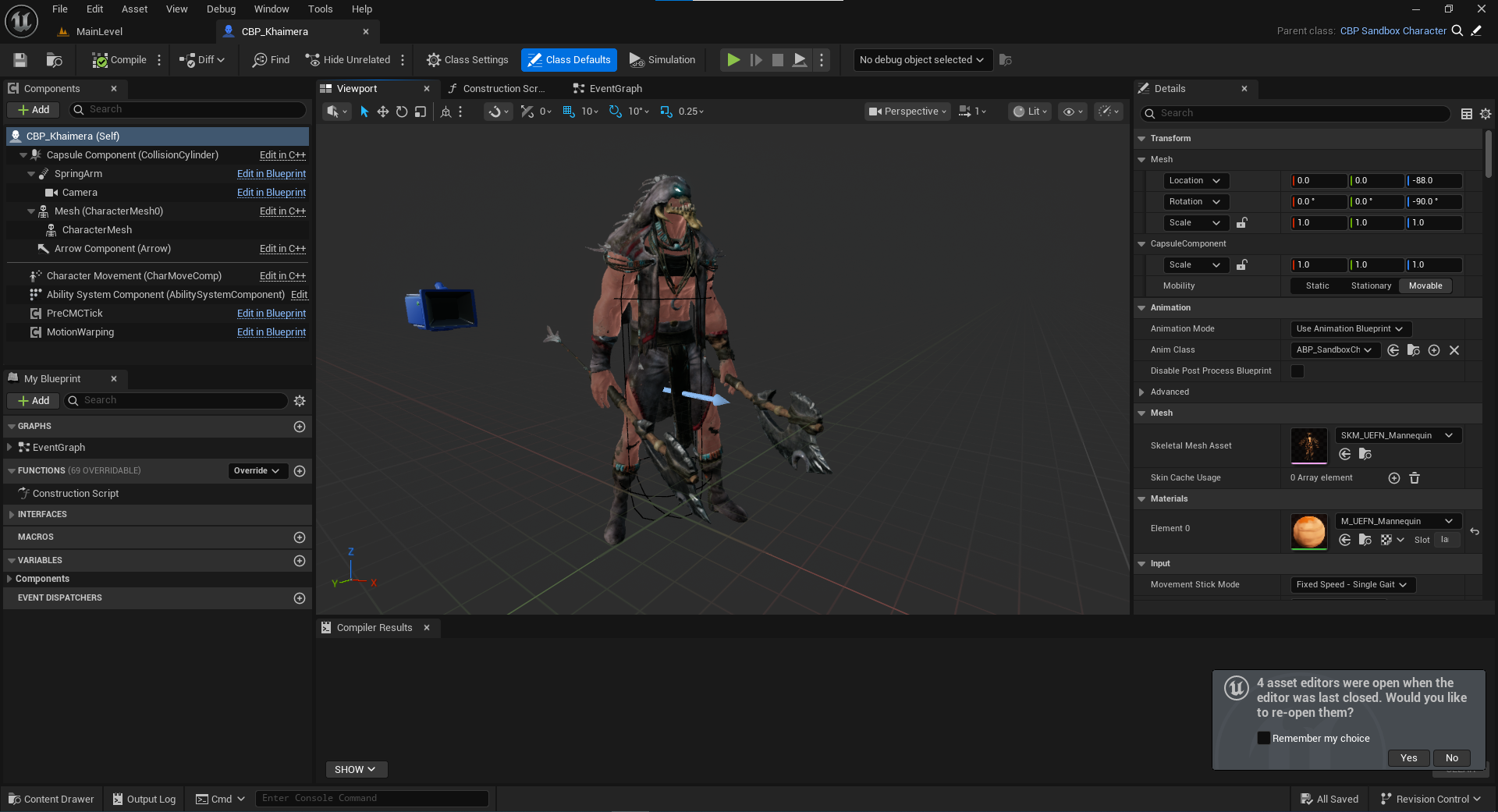
플레이어 캐릭터가 준비되었으니, 다음으로 콤보 공격을 구현해보았다.
플레이어 공격 역시 애니메이션 몽타주 재생은 GAS를 활용할 것이다.
우선 공격에 해당하는 Gameplay Ability의 생성, 그리고 이를 Activate 시키는 코드 등은 보스의 그것과 거의 똑같이 하였다.
// TitanCharacter.cpp

//...
// Sets default values
ATitanCharacter::ATitanCharacter()
{
 	// Set this character to call Tick() every frame.  You can turn this off to improve performance if you don't need it.
	PrimaryActorTick.bCanEverTick = true;

	AbilitySystemComponent = CreateDefaultSubobject<UAbilitySystemComponent>(TEXT("AbilitySystemComponent"));
}

UAbilitySystemComponent* ATitanCharacter::GetAbilitySystemComponent() const
{
	return AbilitySystemComponent;
}
//...

void ATitanCharacter::PossessedBy(AController* NewController)
{
	Super::PossessedBy(NewController);

	if (!AbilitySystemComponent)
		return;

	SetMeleeAbility();
}

void ATitanCharacter::SetMeleeAbility()
{
	if (!AbilitySystemComponent)
		return;

	MeleeAbilitySpecHandle = AbilitySystemComponent->GiveAbility(FGameplayAbilitySpec(MeleeAbility));
}

bool ATitanCharacter::IsUsingMelee()
{
	FGameplayTagContainer TagContainer(FGameplayTag::RequestGameplayTag(TEXT("Combat.Melee.Attack")));
	TArray<UGameplayAbility*> ActiveAbilities;

	GetActiveAbilitiesWithTags(TagContainer, ActiveAbilities);

	return !ActiveAbilities.IsEmpty();
}

void ATitanCharacter::GetActiveAbilitiesWithTags(FGameplayTagContainer GameplayTagContainer, TArray<UGameplayAbility*>& ActiveAbilities)
{
	if (!AbilitySystemComponent)
		return;

	TArray<FGameplayAbilitySpec*> MatchingAbilities;
	AbilitySystemComponent->GetActivatableGameplayAbilitySpecsByAllMatchingTags(GameplayTagContainer, MatchingAbilities);
	for (FGameplayAbilitySpec* Spec : MatchingAbilities)
	{
		TArray<UGameplayAbility*> AbilityInstances = Spec->GetAbilityInstances();
		for (UGameplayAbility* ActiveAbility : AbilityInstances)
		{
			ActiveAbilities.Add(ActiveAbility);
		}
	}
}

bool ATitanCharacter::ActivateMeleeAbility(bool AllowRemoteActivation)
{
	if (!AbilitySystemComponent || !MeleeAbilitySpecHandle.IsValid())
	{
		return false;
	}

	//D("Player TryActivateAbility");
	return AbilitySystemComponent->TryActivateAbility(MeleeAbilitySpecHandle);
}
//...
여기에 추가로, 콤보 공격은 보스와 달리 플레이어의 인풋에 따라 어디까지 할 지가 결정되기 때문에, 새롭게 구현이 필요한 부분이 있었다.
이를 위해, Animation Notify State 클래스를 새로 만들어주었다.
// ANS_Combo.h
UCLASS()
class TITAN_API UANS_Combo : public UAnimNotifyState
{
	GENERATED_BODY()

public:
	virtual void NotifyBegin(USkeletalMeshComponent* MeshComp, UAnimSequenceBase* Animation, float TotalDuration, const FAnimNotifyEventReference& EventReference) override;
	virtual void NotifyEnd(USkeletalMeshComponent* MeshComp, UAnimSequenceBase* Animation, const FAnimNotifyEventReference& EventReference) override;

	UPROPERTY(EditAnywhere)
	FName NextSectionName;

};
// ANS_Combo.cpp
void UANS_Combo::NotifyBegin(USkeletalMeshComponent* MeshComp, UAnimSequenceBase* Animation, float TotalDuration, const FAnimNotifyEventReference& EventReference)
{
Super::NotifyBegin(MeshComp, Animation, TotalDuration, EventReference);
if (ATitanCharacter* TitanCharacter = Cast<ATitanCharacter>(MeshComp->GetOwner()))
{
TitanCharacter->CanCombo = true;
TitanCharacter->NextComboNotify = this;
}
return;
}
void UANS_Combo::NotifyEnd(USkeletalMeshComponent* MeshComp, UAnimSequenceBase* Animation, const FAnimNotifyEventReference& EventReference)
{
Super::NotifyEnd(MeshComp, Animation, EventReference);
if (ATitanCharacter* TitanCharacter = Cast<ATitanCharacter>(MeshComp->GetOwner()))
{
TitanCharacter->CanCombo = false;
}
return;
}
NotifyBegin:
- 이 시점부터 또 공격 입력이 들어오면 다음 콤보 공격으로 이어짐
- CanCombo = true가 그 역할
- NextComboNotify : 다음 콤보 공격에 대한 정보를 가지고 있는 Notify
- 즉 여기서는 이 Notify 자신이 내 바로 다음 콤보 공격에 대한 정보를 가지고 있으므로, NextComboNotify = this를 해줌
NotifyEnd
- 이 시점까지 공격 입력이 또 안들어왔다면 콤보를 초기화
- CanCombo = false가 그 역할
그리고 플레이어 클래스에는 다음과 같은 코드를 추가해주었다.
void ATitanCharacter::ExecuteNextCombo()
{
	if (CanCombo)
	{
		if (UAnimInstance* AnimInst = GetMesh()->GetAnimInstance())
		{
			UAnimMontage* CurrMontage = AnimInst->GetCurrentActiveMontage();
			FName CurrSection = AnimInst->Montage_GetCurrentSection();
			if (NextComboNotify) // null check
			{
				AnimInst->Montage_SetNextSection(CurrSection, NextComboNotify->NextSectionName, CurrMontage);
				CanCombo = false;
			}
		}
	}
}
해당 함수는 공격 인풋이 들어왔을 때, 플레이어가 공격이 가능한 상태라면 호출된다.
콤보를 이어갈 수 있다면, 현재 애니메이션 몽타주를 참조하여 다음 콤보에 해당하는 섹션으로 이동하게 한다.
그리고 다시 CanCombo를 false로 돌리는데,
CanCombo는 다음 콤보 공격 섹션의 ANS_Combo에서 또 다시 true가 될 것이다.

ANS는 실제 콤보 공격 몽타주에서 이렇게 배치해주었다.
해당 영역 시점에 공격 인풋이 들어올 경우, 콤보가 이어지는 것이다.
구현 결과:
여기까지 회고:
- 좋았던 점
- 모션매칭 샘플 프로젝트를 활용한 덕에 플레이어 로코모션 구현을 간단하면서도 퀄리티 높게 해결할 수 있었음
- 콤보 공격을 Animation Notify State로 구현한 덕에 공격이 이어지는 타이밍, 즉 조작감의 조정에 있어 유연성을 확보
- 보스 공격과 마찬가지로 GameplayAbility를 사용함으로서 추후 관리의 용이성 확보
- 아쉬운 점 / 고민 사항
- Gameplay Ability를 사용했고, 플레이어 공격 Gameplay Tag를 Combat.Melee.Attack으로 하였는데, 이후 어떤 공격이 새로 추가될지, 어떤 식으로 어빌리티를 관리할지 설계가 미흡한 상태에서 정함
- 추후에 수정이 필요할 수도
- 전체적으로 아직 GAS에 대한 이해가 부족한 느낌이 듬.
- 플레이어와 보스의 밀리 공격의 전체적인 구현이 유사한데, 클래스는 완전히 분리되어있음
- 추후에 공통요소를 뽑아서 추상클래스로 만드는 작업을 하면 좋을지도
- 에픽게임즈에서 제공하는 공격 모션이 루트모션이 없어, 공격 시 전진 거리를 직접 키프레임을 넣어 만들었는데, 살짝 어색해보임
- 차라리 다른 에셋을 구하는게 나을지도
- Gameplay Ability를 사용했고, 플레이어 공격 Gameplay Tag를 Combat.Melee.Attack으로 하였는데, 이후 어떤 공격이 새로 추가될지, 어떤 식으로 어빌리티를 관리할지 설계가 미흡한 상태에서 정함
작업 내용:
https://github.com/sys010611/Titan/commit/01bdf74cc1eb78af59bf4b9296443e6b6397c5eb
콤보 공격 구현 · sys010611/Titan@01bdf74
+GameplayTagList=(Tag="Abilities.ContextualAnim",DevComment="")
github.com
https://github.com/sys010611/Titan/commit/2464884937680d7690c3c5b5a6dbe1633d1dcb49
플레이어 공격 전진거리 추가 · sys010611/Titan@2464884
github.com
'언리얼 엔진 5 > 액션RPG 게임' 카테고리의 다른 글
| [UE5] 시네마틱 보스배틀 게임 개발일지 (6) - 리팩토링, 데미지 시스템 구현 (0) | 2025.09.28 |
|---|---|
| [UE5] 시네마틱 보스배틀 게임 개발일지 (4) - 보스 공격 구현(GAS) (0) | 2025.09.03 |
| [UE5] 시네마틱 보스배틀 게임 개발일지 (3) - 보스 움직임 구현(BT + EQS) (2) | 2025.08.30 |
| [UE5] 시네마틱 보스배틀 게임 개발일지 (2) - 레벨, 보스 에셋 준비 (0) | 2025.08.27 |
| [UE5] 시네마틱 보스배틀 게임 개발일지 (1) - 시작 (0) | 2025.08.26 |